# Edit scored subjects, markers and remarks
### aim
To correct annotation errors.
### prerequisites
- Your license includes the Annotation Module.
- Your user role allows session recording (Technician, Administrator, or Trainer).
- If you have the user role Trainer, you created the session, received ownership or annotator rights. Trainees can also receive ownership or annotator rights.
### procedure
1. Open a recorded session (see [Review sessions](https://bookstack.noldus.com/link/740#bkmrk-page-title)) and play it.
2. To make new annotations, enter them following the procedure in [Annotate](https://bookstack.noldus.com/link/746#bkmrk-page-title)
To add a remark, press **Ctrl + R** or click this button.
[](https://bookstack.noldus.com/uploads/images/gallery/2023-12/NAJ9tS6hSrfPRVfa-image.png)
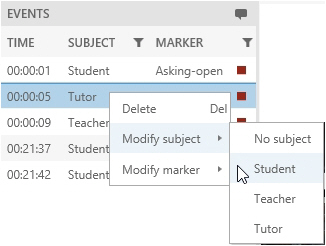
To delete a scored subject, marker or remark, right-click it in the **Event Log** and click **Delete**.
To modify a scored subject or marker, right-click it and select **Modify subject**, or **Modify marker**. Then choose the correct one.
[](https://bookstack.noldus.com/uploads/images/gallery/2023-12/ljyrYAYVTYQDRGZu-image.png)
3. To save the session before you exit it, press **Ctrl + S**.
4. When done, choose **Back**. Choose **Save** to save new edits.
[](https://bookstack.noldus.com/uploads/images/gallery/2023-12/wdigLY2W6FVxqAD1-image.png)
**NOTE** Others can view the scored markers and remarks when a recorded session is edited. To do so, open the Sessions tab and open the session. The markers and remarks appear when the person that edits the session saves it (**Ctrl + S**).
**NOTE** Scored [Markers](https://bookstack.noldus.com/link/745#bkmrk-page-title) and [Remarks](https://bookstack.noldus.com/link/747#bkmrk-page-title) can only be edited by the user that created the session and users that received session ownership or annotator rights.